How it works
Follow one request, end to end.
A PostgreSQL connection check needs a password stored on your phone. Here is what happens between entering the command and running it.
In this example, maya-thinkpad is already paired. The phone holds orders-db-prod, an environment secret with a sensitive PGPASSWORD value. The secret uses Ask mode for this computer, with no temporary access active.
01 / The request
The CLI asks before launching.
Agentknock selects the executable and sends the secret name, command, arguments, working directory, executable details, and reason to the phone. This is context reported by the client. The password has not been delivered, and psql has not started.
agentknock -s orders-db-prod \
  --reason "Confirm the production database is reachable before deploying." \
  -- psql -h db.prod.example.com -U orders_app -d orders \
    -c 'SELECT 1;'
02 / The exchange
The relay carries an encrypted message.
The relay routes the request without keys to read its protected contents. Your phone checks the applicable access settings. Here, Ask mode means the request waits for your decision. Both devices need to be online for the exchange.
03 / Your decision
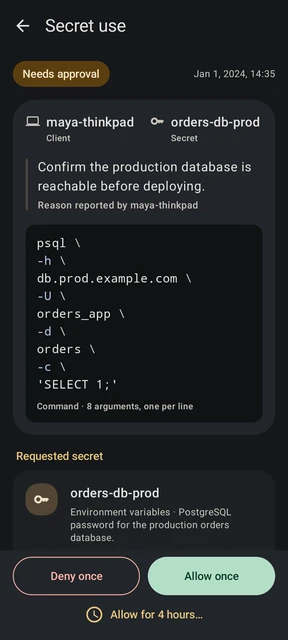
Review this command on your phone.
Check the client, secret, destination, query, and reason. This request names db.prod.example.com and runs SELECT 1;. The screen shows the same command you entered, with its arguments on separate lines.
Choose Allow once to permit this request, or Deny once to reject it.
04 / The response
Your decision determines what happens next.
Allow once
The phone returns the password through the encrypted exchange. The CLI supplies it as PGPASSWORD in the command’s environment and starts psql. PostgreSQL uses it to authenticate; the command’s output appears in your terminal.
Deny once
The phone denies the request. The CLI reports the denial and ends without starting psql. No password is delivered for this request.
A process can read or retain a password it receives. Approval controls delivery, not everything the process does afterward. SSH authentication and Git signing instead request signatures during command execution; their private keys stay on the phone.
Try the flow with a harmless test value.
The getting-started guide walks through setup and a first request without a database or real credential.