01
The API call. The database query.
Provide tokens and passwords through environment variables or standard input. Your tools keep their usual authentication methods.
agentknock -s github -- gh repo viewFor your terminal. And your agents.
Store developer credentials on your Android phone. Give your terminal, scripts, and coding agents access when a command needs it.
Free core features. Optional paid AI review.
Waiting for iOS? Follow @agentknockdev on X for updates.
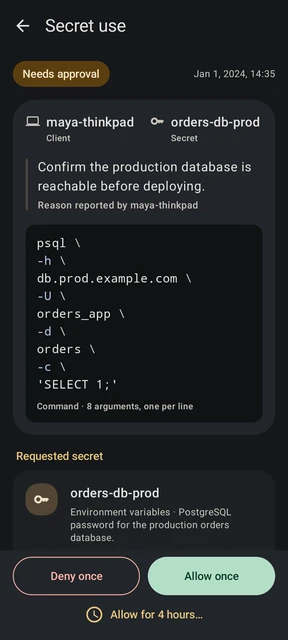
Your computer requests access
agentknock -s orders-db-prod \
  --reason "Confirm the production database is reachable before deploying." \
  -- psql -h db.prod.example.com \
     -U orders_app -d orders -c 'SELECT 1;'
The password is stored on the phone. After approval, Agentknock supplies it to psql for this command.
End-to-end encrypted between your devices
Your phone decides
One phone. The computers you work on.
A home beyond the workspace
A laptop. A remote shell. A fresh development environment. The work moves on, but credentials saved there can stay behind.
Keep their stored home on your phone. Pair each computer once, then let it ask for the access it needs.
Follow one requestKeep one place for access decisions.
Review requests wherever you are.
Familiar tools, a different home for secrets
Provide tokens and passwords through environment variables or standard input. Your tools keep their usual authentication methods.
agentknock -s github -- gh repo viewLet your phone handle SSH authentication. The computer receives a signature; the private key stays on the phone.
agentknock -s work-ssh --no-ssh-passthrough \
  -- ssh -o IdentityAgent=SSH_AUTH_SOCK \
deploy@server.exampleReview a Git signing request on your phone and authorize the signature there. Use the same key from your paired machines.
agentknock -s work-ssh --no-ssh-passthrough \
-- git -c gpg.format=ssh commit -S -m "Ship it"Examples assume a paired computer and configured secrets. SSH needs a registered public key; Git’s signing-key setting must match the selected key or be unset. Environment values reach the command and can be copied by it. SSH authentication and Git signing keep the private key on the phone.
Access decisions
Set approval behavior for each secret, with exceptions for individual computers. The same settings apply to commands you run yourself and commands run by an agent.
Manual decisions, saved approval modes, and temporary access are free.
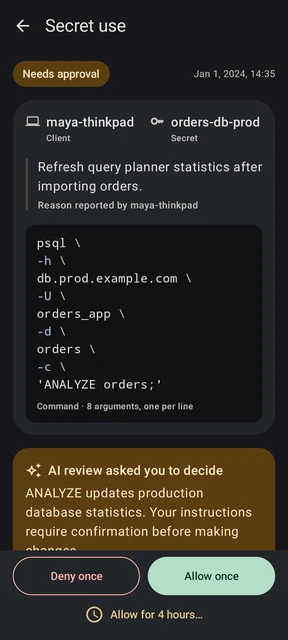
Trust has to be inspectable
The phone and client exchange encrypted messages. The CLI and Android app are open source. The protections, and their limits, are documented.
Android Keystore protects the encryption keys for stored sensitive data, using secure hardware where available.
The relay carries messages without the keys to read their protected contents. AI review is a separate, optional cloud service.
Inspect the app and CLI, check release attestations, and reproduce CLI builds.
Connect your phone and computer, then try a harmless test value. No real credential needed.