Skip to content

Security

Know what you are approving.

See how Agentknock protects stored credentials, what your tools receive, and which devices and services you trust along the way.

What an approval provides

Values for commands. Signatures from your phone.

Passwords and API tokens

After approval, protected values reach the command through its environment or standard input. Your tools use their usual authentication methods.

The command and other processes with sufficient access can read, copy, store, or transmit those values. Agentknock does not save them in its pairing file.

How values are delivered

SSH authentication and Git signing

The phone uses the private key and returns a signature. The computer receives the public key and approved signatures; the private key stays on the phone.

Each authentication or signature follows its applicable access settings. An SSH approval permits authentication; the server controls what the resulting session can do.

How SSH authentication works

Approval protects sensitive-value delivery and private-key operations. Metadata, public keys, and environment values marked non-sensitive can be provided without approval.

Before access is granted

Protection starts on the phone.

  1. Encrypted storage

    Stored values, SSH private keys, and protocol keys are encrypted. Android Keystore protects the encryption keys, using secure hardware where available.

  2. Verified pairing

    Compare the complete verification code on the computer and phone. That check authenticates the intended pairing; the public pairing address starts the process.

  3. Authentication you choose

    Require Android authentication when opening the app or before sensitive actions. Background approvals and signing continue to follow your access settings.

Read about storage and authentication

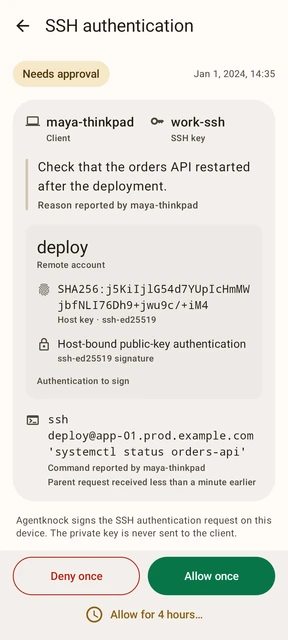
Agentknock Android SSH authentication request showing the remote account, host-key fingerprint, and approval actions.
An SSH authentication request brings the key and connection details to the phone for review.

The trust model

Understand the whole exchange.

An approval releases values or permits signing. Account permissions, the requesting computer, and the phone still matter after that decision.

The phone
Android, the app, and its authorized users control access. A compromised phone can expose values or authorize their use. SSH private keys are decrypted into app memory for signing.
The computer
Command details are reported by the client. They help you review a request, but a modified client can misrepresent them. Agentknock does not sandbox a command or enforce its behavior after approval.
The relay
Protected client–phone messages are encrypted end to end. The relay has no keys to read them, but it can observe routing information, sizes, and timing, and can delay or block exchanges.
AI review
Optional cloud review sends context to the review service and model provider. They can read that context and influence access decisions. The model can make a mistake.

Keep credentials out of review context.

Sensitive stored values and private keys are omitted from AI review. A credential typed into a command argument, reason, or instruction is still part of the submitted context.

Understand protection of past exchanges.

A stolen client pairing key alone cannot decrypt recorded past exchanges. A later compromise of the phone's protocol private key, combined with recorded pairing and exchanges, can expose them. Agentknock v1 has no forward secrecy against that device-key compromise.
Open to inspection

Read the source. Verify a release.

The CLI and Android app are open source. Their release guides cover GitHub attestations; the Android guide also covers APK signatures, and the CLI guide covers reproducible builds. These checks help verify where a release came from, but do not establish that the software is free of vulnerabilities.

Report a concern

Use a private channel.

Report CLI and Android vulnerabilities through their private GitHub reporting channels. For the relay, website, protocol, or an uncertain component, contact Full Disclosure by email.

Start with a harmless test value.

Pair your phone and computer, review one request, and see what the command receives.