
Give an agent temporary access
A coding agent investigating a database issue may need to run several queries. You can allow four hours of access for its computer and secret, while continuing to record each Agentknock request. When the investigation ends, remove the grant and return to individual approvals.
This walkthrough uses a paired computer and an environment secret named staging-db. Store its database password as sensitive PGPASSWORD, with non-sensitive PGHOST, PGDATABASE, and PGUSER values for your staging database. Use a database account whose permissions fit the investigation, and install psql on the computer.
Keep requests tied to individual commands
Section titled “Keep requests tied to individual commands”Give the coding agent an instruction such as:
For staging database queries, run each psql command through Agentknock withthe staging-db secret and a reason explaining that query. Use psql -X -w.Do not print the password or save it in the repository.Launch the agent normally, then have it wrap each database command. The password is supplied to those psql processes. This keeps the command being requested visible on your phone.
On the phone, open Secrets → staging-db → Client access. Select Ask in this computer’s row. This saves an override for this client; other clients retain their existing settings.
Start with a connection check
Section titled “Start with a connection check”Ask the agent to confirm the database and account it reaches:
agentknock -s staging-db \ --reason "Confirm the staging database and account before investigating" \ -- psql -X -w -c 'SELECT current_database(), current_user;'The psql options skip startup files and prevent an interactive password prompt. Agentknock supplies the saved connection values when you approve.
On the phone, open the Secret use request. Confirm that it is from the intended computer, asks for staging-db, and contains that query. The requested data should show the connection details, with the password hidden.
Allow the work session
Section titled “Allow the work session”Tap Allow for 4 hours…. Read the confirmation before choosing Allow for 4 hours.
For this request, the grant should name your computer and staging-db, and describe access to protected values for any command. It allows future commands from this client to receive this secret’s sensitive values, without asking you or AI. It is not restricted to psql, this query, or the reason you supplied.
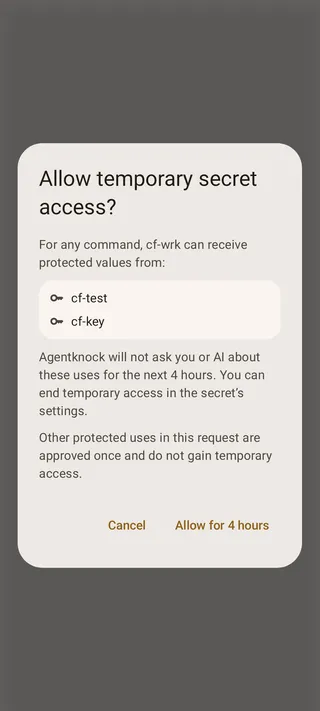
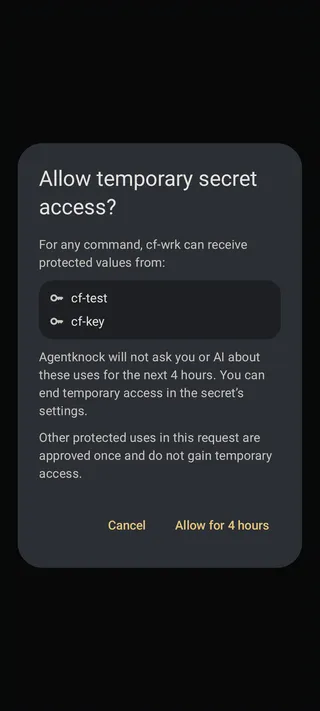
The original query now runs. Check its output for the intended database and account. Then ask the agent to continue with another diagnostic query, for example:
agentknock -s staging-db --reason "Check the staging PostgreSQL version" \ -- psql -X -w -c 'SELECT version();'The next request should proceed without a new approval. Open it in Requests to see that temporary access allowed it. The audit log also records the grant and subsequent uses.
End access when the investigation finishes
Section titled “End access when the investigation finishes”Open Secrets → staging-db and find Temporary access. The entry shows the client, operation, and expiry. Tap End for that grant. You can also end it from the client’s details.
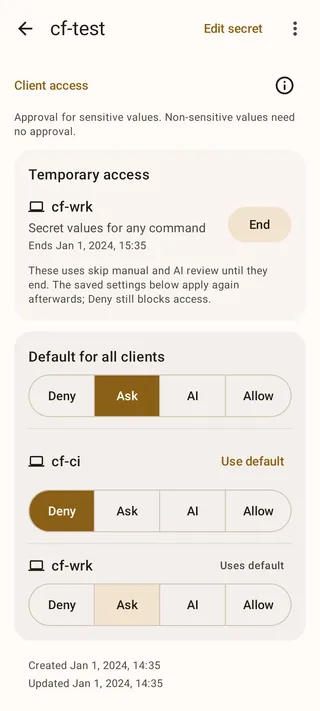
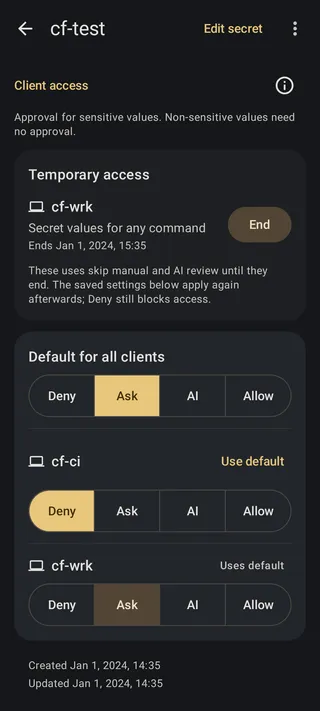
Run the connection-check command again. Because this client’s setting is Ask, it should wait for your decision again. Deny it if no further work is needed, or allow that one request.
Grants expire after four hours without being extended by use. They survive normal app restarts. Editing the secret’s values, name, or secret instructions can end access sooner. A grant for environment values does not also permit SSH authentication or Git signing; those operations have separate grants.
Ending a grant stops future automatic approvals. It does not terminate a running database session or retrieve a password that a process already received. If you need each new command checked against written instructions throughout the task, use AI review instead.